-
Charges & Policies
-
Shariah Compliant Dropshipping in Pakistan
-
HHC Portal Basic Training
-
- How to work with HHC Dropshipping step by step?
- What is a business profile in HHC & how can I set it up?
- Does HHC dispatch parcels with Our (Dropshipper's) information on the Shipping Label?
- If I provide you with my courier account's CN# and slip with advance payment, will you pack the product and give it to that company?
- How to Mention Special Instruction for Courier Rider on HHC Dropshipping?
- How to use the “Allow to Open” Service with HHC Dropshipping?
- My HHC account is on a trial period of 30 days, what does it mean?
- What are Notifications and where can I find notifications on HHC Dropshipping?
- Where to Find Suppliers on HHC Dropshipping?
- What is News Feed & How does it work?
- How to Contact HHC Support (Complete Guide)
- HHC Dropshipping Does Not Allow Daraz or Public Marketplace Integration
- Step-by-Step Registration Process for HHC Dropshipping Account
-
- How can I cancel order on HHC Dropshipping?
- Why tracking your order is important?
- Where can i find Courier Tracking IDs?
- My order is On Hold & has not been dispatched yet. What should i do?
- How can I reattempt orders & what is RCP? OR What is Shipper Advice?
- How can i directly submit a Shipment Reattempt Request without launching support ticket?
- What should I do if my order is delivered but is not updated on HHC or the Wrong status has been updated on my order?
- Where can I find CSV & How to import CSV?
- How Can I Filter Products via City Name?
-
- What is Stock Confirmation, How to Do It, and Why is It Important?
- How Can I Know About Product Quality on HHC Dropshipping & How SDR and PDR Effect Product Quality?
- If a high-priced product on HHC is available at a lower price in the market, how can we communicate with the supplier or team about this?
- Where can I ask if I have any questions related to a product?
-
-
HHC Portal Advance Training
-
- HHC Dropshipping & Courier Shipment Status Guide
- Bulk Product Uploading Using CSV File
- Whatsapp Message Feature! Use and Setting Explained
- Import Bulk Orders Through CSV File - HHC Dropshipping Bulk Order Import Feature
- Manage & Control Order Delivery Related Issues Using Transit Report
- Improved PDR Ratings & Problematic Products Report
- HHC & Courier Tracking Statuses Guide
-
-
Profit Maintainability
-
HHC Digital Marketing & ecommerce Masterclass
-
- CH2 - EP01 - Hosting and Domain - Website Development
- CH2 - EP02 - WordPress vs Shopify - Website Development
- CH2 - EP03- Installing WordPress from cPanel -WordPress Development
- CH2 - EP04 - SSL & WooCommerce - WordPress Development
- CH2 - EP05- Variable Products-Homepage-Theme Selection - WordPress Development
- CH2 - EP06 - Theme Installation - Wordpress Development
- CH2 - EP07 - Theme Setup-Required Plugins-Demo Import - Wordpress Development
- CH2 - EP08-Theme Setup - Header-Menu-Logo - WordPress Development
- CH2 - EP09-Store Setup - Homepage & Contact Page Design - WordPress Development
- CH2 - EP10-Bulk Product Upload Using CSV File - WordPress Development
- CH2 - EP11- Generating Privacy Policy and Return Policy - WordPress Development
- CH2 - EP12- Footer Designing & Generating About Us Content Using Chat GPT - WordPress Development
- CH2 - EP13- Chat Button & Banners Designing - Error Resolving Approach - WordPress Development
- CH2 - EP14- Slider Revolution and Product Grids - WordPress Development
- CH2 - EP15- Setting Checkout Form and Delivery Charges - WordPress Development
- CH2 - EP16 - Adding Coupons & Discounts - WordPress Development
- CH2 - EP17 - Setting up Mobile Version of the Website - WordPress Development
- CH2 - EP18 - Summarizing WordPress Development and Other Niche Websites - WordPress Development
-
- CH3 - EP01- Setting up Social Media Existence - Digital Marketing Practical
- CH3 - EP02 - Meta Business Manager-Ad Account-Pixel Setup - Digital Marketing Practical
- CH3 - EP03 Part-1- Product Hunting for Dropshipping Model - Digital Marketing Practical
- CH3 - EP04 - Conversion Rate Optimization - Digital Marketing Practical
- CH3 - EP05 - Content Scrapping and Product Uploading - Digital Marketing Practical
- CH3 - EP06 - Launching First Facebook Marketing Campaign - Digital Marketing Practical
- CH3 - EP07 - Ad Performance Evaluation - Digital Marketing Practical
- CH3 - EP08 - Call Confirmations & Order Fulfilment - Digital Marketing Practical
- CH3 - EP09 - Google Analytics Integration - Digital Marketing Practical
- CH3 - EP10 - Advance Features and Facebook Ads Scaling - Digital Marketing Practical
- CH3 - EP11 - Facebook Leads Ads - Digital Marketing Practical
-
- CH4 - EP01 - TikTok Ads Overview - Digital Marketing Advance Concepts
- CH4 - EP02 - Understanding Facebook Algorithm - Digital Marketing Advance Concepts
- CH4 - EP03-Email & Influencer Marketing-Organic Activities-Google My Business - DM Advance Concept
- CH4 - EP04- Search Engine Optimization - Digital Marketing Advance Concepts
- CH4 - EP05- Extremely Advance Digital Marketing Strategies - Digital Marketing Advance Concepts
-
Delivery Time & Delivery Ratio Course
-
All Delivery Time/Ratio Trainings
Where can I ask if I have any questions related to a product?
With Product Q/A, you can ask any questions related to the product, such as about color, size, or request for a real image or video.
Product Q&A on HHC for Product-Related Queries
If you have any product-related queries on HHC, you can use the “Product Q&A” feature to communicate with the supplier or team. Here’s how you can do it:
Steps to Launch a Product Q&A:
1. Identify the Product:
– Open the product page on HHC for which you have a query.
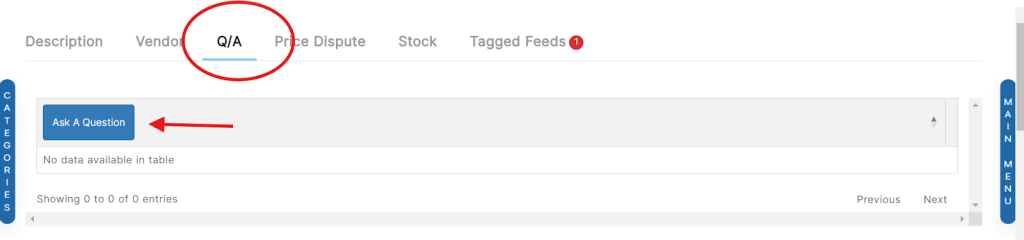
2. Locate the Product Q&A Option:
– Scroll down the product page until you find the “Product Q&A” section.
3. Initiate the Q&A:
– Click on the “Product Q&A” option.
– Then, click on “Ask a Question.”
Figure:
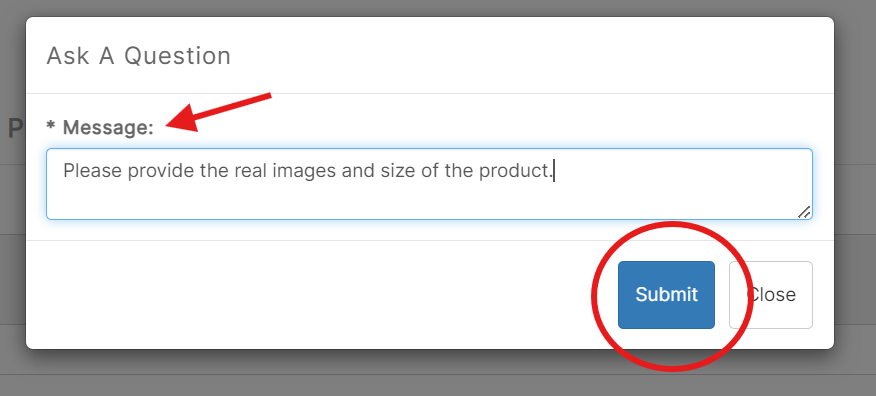
4. Fill Out the Q&A Form:
– Message: Describe your query or issue related to the product. For example, ask about product features, size , or any other details you need.
– Relevant Details: Provide any relevant information that can help address your query.
– After filling in all the required details, click “Submit.”
Figure:
After Submitting the Q&A:
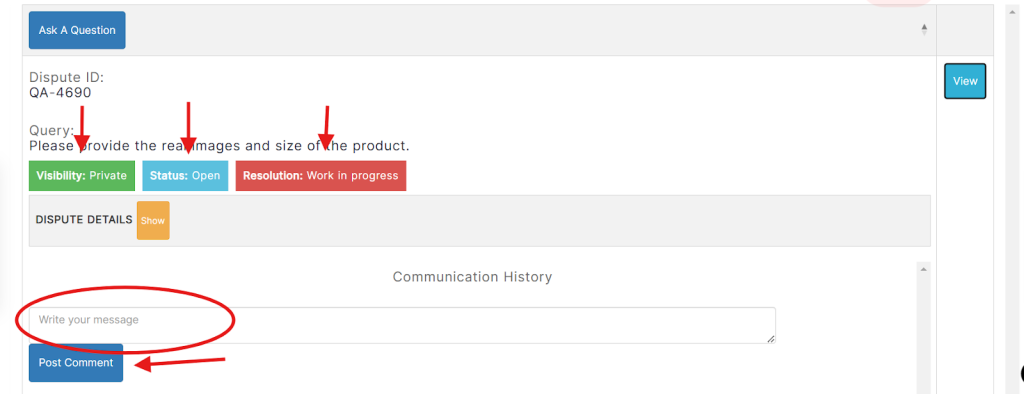
– Q&A Details: Once submitted, you will see the details of your product question.
– Visibility: The question will be marked as private, meaning only you can see the response.
– Status: Initially, the status will be “Open,” indicating that the question is being processed.
– Resolution: The resolution status will show as “Work in Progress,” meaning the question is under review.
Checking and Responding to the Q&A:
– View Details: Click on “View” to see the latest updates and details about your question.
– Comment: If you need to add any additional comments or information, you can do so in the provided comment box.
Visual Guide:
Monitoring Your Q&A:
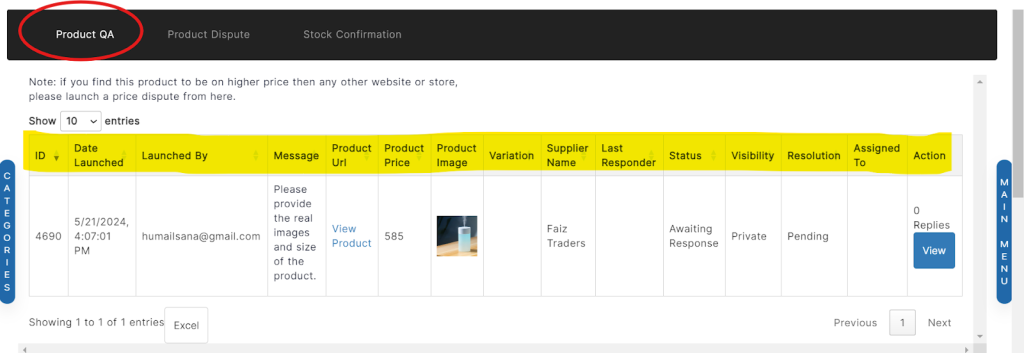
– Product Inquiries Page: You can also view all your launched questions on the “Product Inquiries” page.
Link: https://hhcdropshipping.com/Member/my-account/product-inquiry/
Visual Guide:
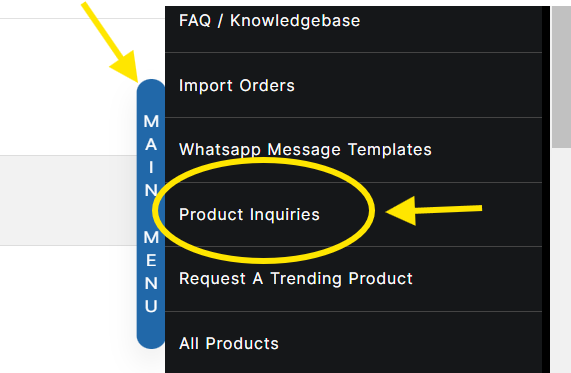
Product Inquiry Page:
Processing Time:
– The vendor department will review your query to ensure its validity. They will then communicate with the vendor to address your question.
– This process typically takes 2 to 3 working days.
Using the “Product Q&A” feature ensures that you can get detailed and specific information about products directly from the supplier, helping you make informed decisions and better manage your dropshipping business.